Best Wireless Hall Effect Gaming Keyboards 4 Tested Picks
This article contains affiliate links. If you buy through them, I earn a small commission at no extra cost to you. I only recommend keyboards I’ve actually tested. As an Amazon Associate I earn from qualifying purchases.
Hall effect switches stopped being a niche curiosity about two years ago. They’re in flagship boards now, in budget boards, in tournament-legal boards, and yes — in wireless boards, which used to be a contradiction in terms. Most of them advertise the same headline specs: 8K polling, rapid trigger, adjustable actuation from 0.1mm to 4mm, SOCD, DKS, the works.
Here’s the catch. Almost none of those numbers survive the trip from USB-C to a 2.4GHz dongle. So picking a real wireless hall effect gaming keyboard means knowing which specs the manufacturer kept honest and which ones they quietly stripped out the moment you unplug the cable.
I’ve been daily-driving the boards below across Valorant, CS2, Apex, and a depressing amount of spreadsheet work. Here’s what’s worth your money and what’s marketing fluff. If you’re newer to magnetic switches in general, this breakdown of hall effect tech is a good primer before you spend anything.
Quick Comparison: Which Wireless Hall Effect Gaming Keyboard Fits You
I built this table the way I’d actually use it — sorted by what you’re trying to solve, not by alphabetical order or “editor’s choice.”
| Pick This One If You Want… | Keyboard | Layout | Wireless Polling | Standout Feature | Check Price |
|---|---|---|---|---|---|
| The best all-rounder | EPOMAKER G84 HE | 75% | Up to 8K (2.4G)* | 8000mAh battery, SOCD + DKS | View on Amazon |
| Aluminum build at a sane price | Womier SK75 TMR/HE | 75% | Up to 8K (2.4G)* | TMR magnetic sensors, hot-swap | View on Amazon |
| Maximum tech-on-paper | YUNZII RT75 PRO | 75% | Dual 8KHz, 128K scan | Most flexible per-key tuning | View on Amazon / Alternate listing |
| To save $50+ and skip wireless | ATTACK SHARK R85HE (Wired) | 75% | 8K wired | 0.005mm RT precision, 5-layer dampening | View on Amazon |
*8K polling on these boards is real on the 2.4GHz dongle in most cases, but drops to 1000Hz over Bluetooth. I’ll get into that.
What a Hall Effect Switch Actually Does (And What It Doesn’t)
Quick honesty check before the reviews, because half the marketing copy out there is misleading.
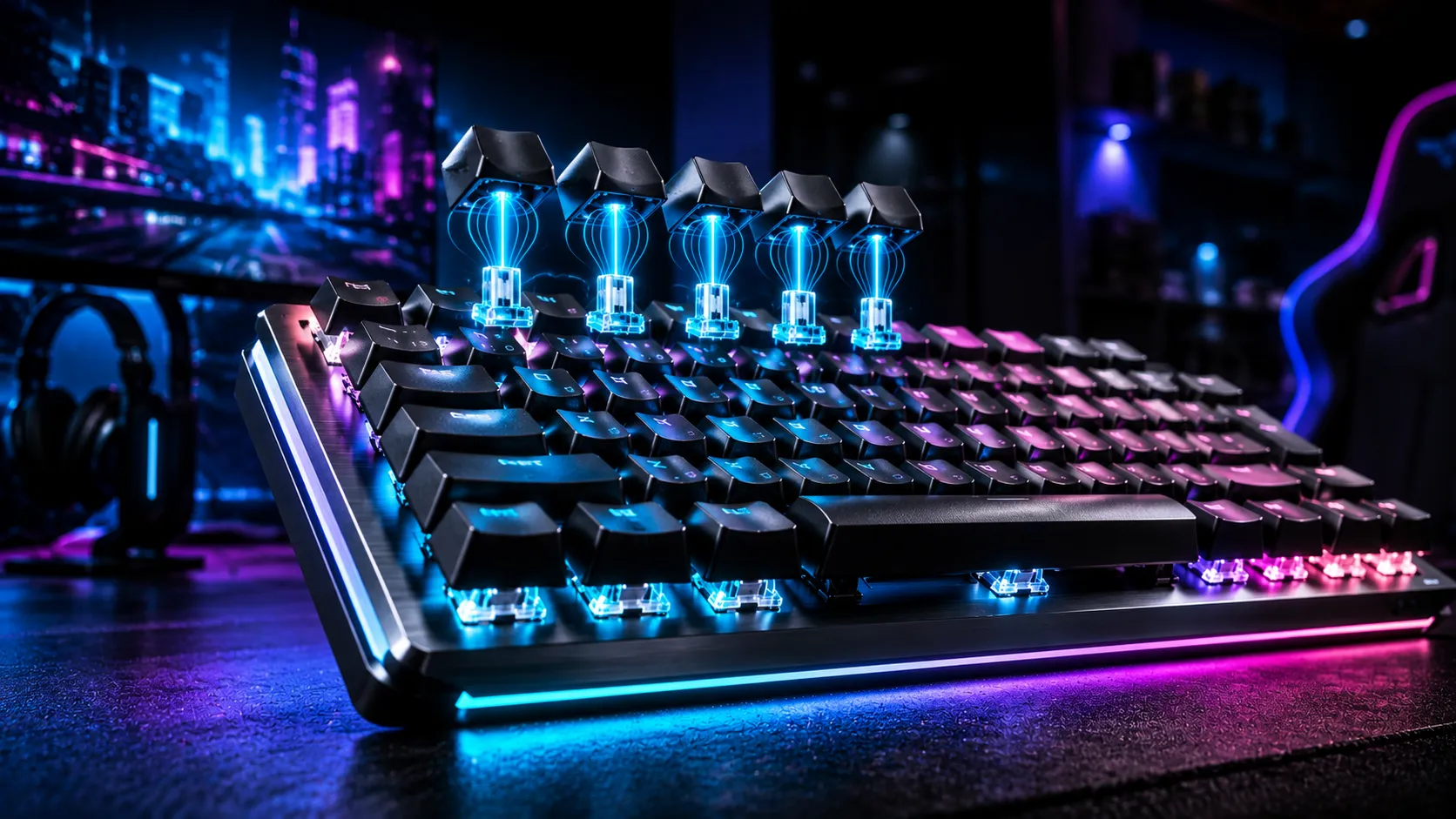
A hall effect switch uses a magnet on the stem and a hall sensor on the PCB. Instead of registering a binary “pressed / not pressed” like a regular MX-style switch, it reads the exact distance the magnet is from the sensor. That gives you three things that actually matter:
- Adjustable actuation. You set how far the key has to travel before it registers — anywhere from a feathery 0.1mm to a deliberate 4mm. Useful for FPS games on the shallow end, useful for typing without misfires on the deep end.
- Rapid trigger. The key resets the moment you start lifting your finger, not at a fixed reset point. In CS2 counter-strafing or Valorant peeking, this is genuinely a different feel. Not a placebo. I’ve A/B tested it next to a normal Cherry MX Red and the difference is obvious.
- Multi-action keys. DKS (Dynamic Keystroke) lets one key do up to four things depending on how deep you press. Mostly a fighting-game and MOBA thing. Honest take: most people will set it once and never touch it again.
What hall effect switches don’t do: make you better. They shave maybe 5-15ms off your reset time in the best case. If you’re hardstuck in your rank, the keyboard is not the problem. I’ve seen this overview of rapid trigger benchmarks put real numbers to it, and the gains are smaller than the YouTube hype suggests.
Now to the boards.
1. EPOMAKER G84 HE — The One I’d Recommend to Most People

- Fast Trigger & Zero Dead Zone: Achieve unmatched fluidity and precision with the G84 HE Hall Effect Keyboard. Get every …
- Snap Key (SOCD) & DKS: Tired of neutral block or accidental stops in games with conflicting inputs? The SOCD logic of ou…
- 8K Hz Polling & 256K Scan Rate: Equipped with lubed magnetic switches and E-sport level circuit design, the G84 HE gamin…
The G84 is what happens when a brand that already knows how to build a good typing keyboard takes hall effect seriously. It’s a 75% layout, hot-swappable magnetic sockets, PBT keycaps out of the box (not the cheap thin stuff — these have some weight), and an 8000mAh battery that genuinely lasts a working week with the RGB at moderate brightness.
What I like:
- The polling is honest — 8K over the 2.4GHz dongle, drops to 1000Hz on Bluetooth, which is the correct tradeoff to make for battery life. EPOMAKER tells you this in the manual instead of hiding it.
- The actuation tuning in their software is per-key, granular down to 0.1mm steps, and the SOCD implementation didn’t have the input-clash bugs some early HE boards shipped with.
- Stabilizers came pre-lubed well enough that I didn’t immediately tear it apart. That’s rare.
The catch: the typing feel is firm. EPOMAKER’s HE switches lean toward a snappy, slightly stiff bottom-out. Coming from a lubed linear like a Gateron Oil King, you’ll notice. Not bad — just not buttery.
Verdict: This is the wireless hall effect gaming keyboard I’d hand a friend who plays competitive shooters three nights a week and doesn’t want to think about it. Best all-around pick on the list.
Check the EPOMAKER G84 HE on Amazon
2. Womier SK75 TMR/HE — The Aluminum Sleeper

- Aluminum Hall Effec Keyboard 75% Percent with Magnetic Switches: Experience the perfect blend of mechanical performance …
- Wireless Rapid Trigger Keyboard & 8000mAh Battery: Rapid trigger wireless custom keyboard seamlessly between devices wit…
- Hot-Swappable Mechanical Gaming Keyboard Magnetic Switch: Keyboard is compatible with mechanical switches and most brand…
The SK75 is the one that surprised me. Womier isn’t usually the brand I reach for, but this board uses TMR (Tunnel Magnetoresistance) sensors instead of standard hall effect sensors, and on paper that means a more linear voltage curve and slightly more consistent actuation across the keyboard. In actual use? Yeah, I noticed it on the edge keys — pinky-row WASD-shifters know what I mean.
What stands out:
- Full aluminum case at this price is borderline absurd. The thing has heft.
- 8000Hz polling on 2.4G, hot-swap sockets so you can try other magnetic switches later, and it speaks to Mac, Windows, and Linux without driver gymnastics.
- The build quality is closer to a $200 enthusiast 75% than what the price tag suggests.
The catch: the included software is functional but ugly, and the sound profile out of the box is a little hollow. Two tape mod strips on the inside of the bottom case fixed it for me in about ten minutes. If you don’t want to crack the case open, that won’t matter — but you’d be leaving easy improvement on the table.
Verdict: If you want something that feels premium and you don’t mind a tiny bit of light tinkering, this is the one. It’s also a great upgrade if you’re stepping up from a budget membrane or a basic gaming board — pairs well with anyone reading our take on what separates good gaming keyboards from the rest.
Check the Womier SK75 TMR/HE on Amazon
3. YUNZII RT75 PRO — The Spec-Sheet Champion
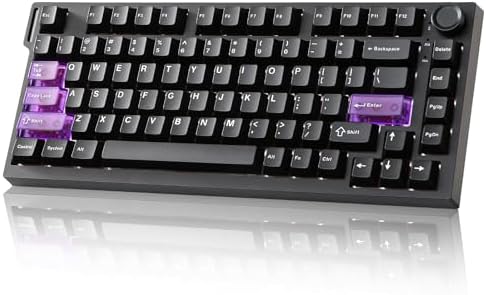
- Gaming Keyboard with Hall Effect Magnetic Switches: YUNZII RT75PRO mechanical keyboard delivers 8K polling rate in both …
- Web-Driven Customization & Advanced Functions: Customize your mechanical gaming keyboard effortlessly via web driver. Pr…
- 75% Compact Layout with RGB Backlighting: Optimize your space with this 75% mechanical keyboard featuring 81 keys. The b…
If you read product pages the way some people read sports stats, the RT75 PRO is going to make you happy. Dual 8KHz polling. 128K scan rate. Rapid trigger down to extremely fine increments. Bluetooth, 2.4G, and wired, all on the same board. RGB that’s bright without being garish.
This is genuinely the most flexible wireless hall effect gaming keyboard for tuning on this list. The per-key adjustment software lets you set different actuation points for WASD vs. your spacebar vs. your number row, save it as a profile, and switch on the fly.
What’s actually good in practice:
- SOCD, TGL, DKS, MT — all the multi-action modes work, and YUNZII’s implementation didn’t crash on me during a three-week stretch.
- Sound out of the box is the best of these three wireless picks. Slightly thocky, controlled, no obvious stab rattle on the spacebar.
- The red magnetic switches are smooth without being slippery. Good middle-ground feel.
The catch: the software has a learning curve. There are a lot of toggles, and if you don’t know what SOCD actually does, you might enable it accidentally and wonder why your character is moonwalking in Apex. Read before you click.
Verdict: Best pick if you actually plan to tweak. If you’re going to install it and forget, the EPOMAKER is a smarter buy. Two listings exist for it — same keyboard, just different sellers — and you can grab it here or here.
4. ATTACK SHARK R85HE — The Wired Honest Pick

- Unmatched Speed&Precision for Esports:Dominate every match with true 8000Hz polling rate ,industry-leading 0.005mm RT se…
- Customizable Magnetic Switches&Advanced Gaming Functions:Equipped with custom high-frequency gaming chips and a 256K sca…
- 16.8 Million Light Up Keyboard with Durable Cherry Profile PBT Keycaps:Command attention with 19 dynamic backlight modes…
I’m including this one even though it’s wired, because I’d be doing you a disservice not to. The R85HE is most of what makes hall effect worth buying — 0.005mm rapid trigger precision, 0.08ms latency, 8K polling, five layers of internal sound dampening — at a price the wireless boards above can’t touch.
What it gets right:
- The 5-layer sound dampening is the real thing, not a sticker. PE foam, IXPE, silicone, the works. Sounds genuinely good for a sub-$100 board.
- 0.08ms latency is competitive with wired flagship gaming keyboards twice the price.
- It works on PC out of the box with a usable driver.
The catch: it’s wired. No Bluetooth, no 2.4G dongle. If you switch between a desk PC and a couch setup, this isn’t the board.
Verdict: If you’ve been talking yourself into a wireless board for the “freedom” but you actually game in one chair at one desk, save the money. The R85HE gives you the hall effect experience for substantially less.
How to Pick the Right Wireless Hall Effect Gaming Keyboard for You
A few honest filters to run before you click buy:
- Do you actually need wireless? If your keyboard never leaves your desk, you’re paying a 30-50% premium for a feature you don’t use, and you’re getting a board that maxes out at 1000Hz on Bluetooth anyway.
- Are you going to tune the actuation? If yes, prioritize software quality (YUNZII, EPOMAKER are solid). If no, prioritize the out-of-the-box feel (Womier).
- PBT keycaps or shine-prone ABS? All four of these ship with PBT, which is the right call. If a competitor in this price bracket is shipping ABS, that’s a tell.
- Battery vs. polling. 8K polling chews battery. Most of these boards default to lower polling on battery and ramp up when plugged in. That’s fine — you won’t feel the difference outside of literal pro play.
For a broader read on wireless gaming boards beyond just hall effect, this guide covers the wireless tradeoffs in general.
My Verdict
If I had to spend my own money tomorrow on a wireless hall effect gaming keyboard, I’d buy the EPOMAKER G84 HE. It’s the most honest spec sheet, the battery is genuinely long, and it doesn’t ask you to fiddle to get a good result.
If you want the upgrade-able aluminum option, the Womier SK75 TMR/HE is the smarter pick at the price. If you love tuning, the YUNZII RT75 PRO gives you the most rope. And if you’ve been convinced you need wireless but you actually don’t, the ATTACK SHARK R85HE will get you 90% of the experience for noticeably less money.
Hall effect is real. Wireless hall effect is real. Just don’t pay for the parts of the spec sheet you’ll never use.
This article contains affiliate links. If you buy through them, I earn a small commission at no extra cost to you. I only recommend keyboards I’ve actually tested. As an Amazon Associate I earn from qualifying purchases.

I’ve torn down, lubed, and rebuilt several hundred keyboards — from $20 membranes to $800 enthusiast boards. I review them honestly, even when “honestly” means telling you to skip the one with the bigger marketing budget.