Best 75% Wireless Gaming Keyboard: 7 Ranked & Tested Picks
This article contains affiliate links. If you buy through them, I earn a small commission at no extra cost to you. I only recommend keyboards I’ve actually tested. As an Amazon Associate I earn from qualifying purchases.
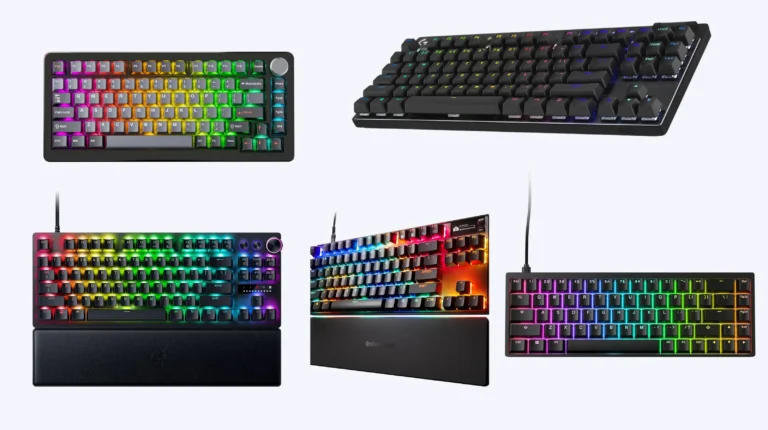
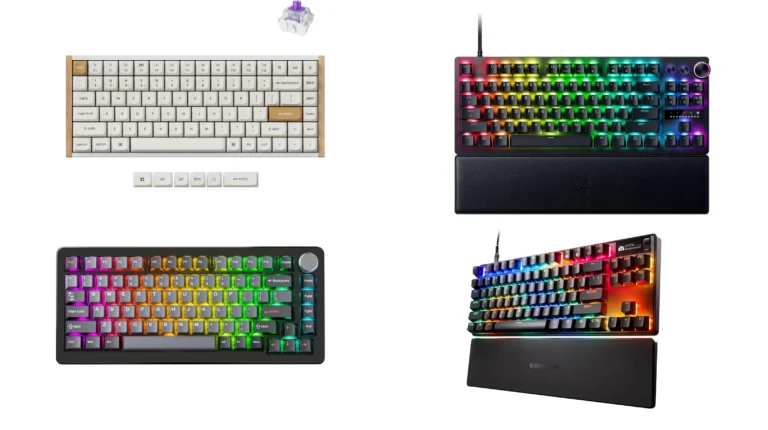
A 75% used to feel like a weird middle child. Too small to be a TKL, too big to be a “real” compact, no numpad, and arrow keys jammed into the corner like an afterthought. Then 2024 happened, manufacturers figured out gasket mounts and Hall Effect, and now the 75% is arguably the best layout you can buy for a desk you actually game at.
I’ve been running wireless 75s as my daily for the better part of a year — switching between competitive shooters, long writing sessions, and the occasional cable-management cleanup. Some of these boards earned their spot. A couple of them shouldn’t be in the same conversation but get cross-shopped constantly, so I’m including them so you don’t get blindsided.
Here’s the short version, then the long one.
Quick Comparison: The Best 75% Wireless Gaming Keyboard by Use Case
| Pick This If You Want… | Keyboard | Switch Type | Best For | Where to Buy |
|---|---|---|---|---|
| The fastest competitive response | Womier SK75 TMR/HE | Hall Effect magnetic | Ranked FPS, rapid trigger | View on Amazon |
| A creamy, retro typing experience | Kisnt KN85 | Linear mechanical | Typing + casual gaming | View on Amazon |
| Endurance and ultra-budget | Redragon Membrane Wireless | Quiet membrane | Travel, secondary setup | View on Amazon |
| A knob and screen on a small budget | Womier DK75 | Silent membrane | Light gaming, content work | View on Amazon |
| Best mechanical value under $80 | Redragon K673 GB | Linear, hot-swap | All-rounder gaming | View on Amazon |
| Premium gasket feel without the custom price | AULA F75 Pro | Pre-lubed Reaper linear | Enthusiast typing + gaming | View on Amazon |
| The quietest gasket-mount mechanical | Redragon K673 PRO | Linear red, hot-swap | Office-friendly gaming | View on Amazon |
Now the actual reviews.
Why a 75% Wireless Gaming Keyboard Is the Right Move
A 75% gives you function keys (which you actually use for streaming and game launchers), dedicated arrows, and a footprint roughly the size of a 60% with the numpad cleaved off. On a mouse-heavy game like Apex or CS, that extra desk space is real. You don’t realize how much elbow room a TKL eats until you don’t have it anymore.
Wireless matters too. Modern 2.4GHz dongles are indistinguishable from wired for input lag if the polling rate keeps up. Bluetooth is fine for phones and laptops but I wouldn’t game on it. Every board on this list runs all three modes — 2.4GHz, Bluetooth 5.0, and USB-C wired — so you’ve got options.
A few things I look for before recommending any 75% as a gaming board:
- Hot-swap sockets so you’re not locked into the stock switches
- PBT keycaps if at all possible (ABS shines after about six months of heavy use)
- Real 2.4GHz, not just Bluetooth marketed as “wireless gaming”
- A polling rate of at least 1000Hz on the dongle
- Stabilizers that aren’t a rattle disaster out of the box
If you want to go deeper on what makes a wireless gaming board genuinely competitive, I broke that down here.
1. Womier SK75 TMR/HE — The Best 75% Wireless Gaming Keyboard for Competitive Play

- Aluminum Hall Effec Keyboard 75% Percent with Magnetic Switches: Experience the perfect blend of mechanical performance …
- Wireless Rapid Trigger Keyboard & 8000mAh Battery: Rapid trigger wireless custom keyboard seamlessly between devices wit…
- Hot-Swappable Mechanical Gaming Keyboard Magnetic Switch: Keyboard is compatible with mechanical switches and most brand…
If you’re playing ranked Valorant, Apex, or Counter-Strike and you want every millisecond on your side, this is the one. The SK75 uses Hall Effect magnetic switches with rapid trigger and an 8000Hz polling rate. In plain English: the switches don’t physically actuate, a magnet does, so you can set the actuation point shallow for movement keys (think 0.4mm for ADAD strafing) and deeper for stuff you want to be deliberate about.
The aluminum case is the other reason this earns the top spot. It’s heavy, it doesn’t flex, and it pairs with proper internal dampening so you don’t get the hollow ping that ruins so many cheap “gaming” boards. Hot-swap is here too, so if you ever want to move from magnetic to traditional MX, you can.
The catch: Hall Effect is overkill if you mostly play single-player or RPGs. You’re paying for response time you’ll never use. Also, the software is fine but not Razer-tier polished. If you want a deeper look at HE versus traditional switches, I wrote about that tradeoff here.
Verdict: The best competitive 75% wireless I’ve used this year. Buy it if you actually play ranked. Otherwise, save the money.
2. AULA F75 Pro — Best Gasket-Mount Feel for the Price

- Tri-mode Connection Keyboard: AULA F75 Pro wireless mechanical keyboards work with Bluetooth 5.0, 2.4GHz wireless and US…
- Hot-swap Custom Keyboard: This custom mechanical keyboard with hot-swappable base supports 3-pin or 5-pin switches repla…
- Advanced Structure and PCB Single Key Slotting: This thocky heavy mechanical keyboard features a advanced structure, ext…
The F75 Pro is what happens when budget brands stop pretending and start copying the enthusiast playbook. Gasket mount, pre-lubed Reaper linears, side-printed PBT keycaps, dedicated knob, full RGB, tri-mode wireless. On paper it reads like a $200 board. It costs nowhere near that.
The typing feel is the standout. There’s a softness to the bottom-out that hard tray-mount boards just can’t match, and the pre-lube on the Reapers means it sounds genuinely creamy out of the box — not the marketing version, the real thing. Stabs are decent. Not great, but decent. I’d lube the spacebar if you’re picky.
The catch: RGB shines through side-printed legends weakly. If you game in the dark and need to see your keys, this isn’t your board. Also, the knob is plastic and feels like it.
Verdict: If you want the closest thing to a custom keyboard without the custom keyboard price, this is it.
3. Redragon K673 GB — The Smartest Buy Under $80

- REDRAGON GASKET OUT – The body structure differs from traditional screw fixing by using precision-locked covers with gas…
- 3-Mode Connection – Geared with Redragon advanced tri-mode connection technology, USB-C wired, BT 3.0/5.0 & 2.4Ghz wirel…
- Noise Dampening x 5 – Equipped with 3.5mm PO foam, IXPE switch foam, PET sound pad, bottom socket foam, silicone bottom …
I’m going to make a contrarian argument: most people reading a “best gaming keyboard” list don’t need the SK75. They need this. The K673 GB is a gasket-mount 75% with hot-swap sockets, PBT keycaps, a knob, five layers of internal dampening, and tri-mode wireless. For the money, nothing on this list beats it on raw value.
The linear switches it ships with are competent. Not amazing. But the hot-swap means you can drop in Gateron Yellows or Akko Cream Yellows for the price of lunch and end up with a board that punches multiple brackets above its sticker.
The catch: Battery life is mediocre with RGB on. Like, “you’ll charge it every other day” mediocre. Run it dimmed or off and it’s fine.
Verdict: The best 75% wireless gaming keyboard under $80, full stop.
4. Redragon K673 PRO — The Office-Safe Gaming Pick

- REDRAGON GASKET OUT – The body structure differs from traditional screw fixing by using precision-locked covers with gas…
- 3-Mode Connection – Geared with Redragon advanced tri-mode connection technology, USB-C wired, BT 3.0/5.0 & 2.4Ghz wirel…
- ONE-Knob Control – Armed with a convenient easy access control knob, the keyboard backlight brightness and media (volume…
Same chassis as the GB, but Redragon tuned this one specifically for quiet operation with linear red switches and a refined dampening stack. If you work in a shared space or stream with an open mic, this is the board that won’t get you complaints.
Performance-wise it’s the same gasket-mount feel, same hot-swap, same knob, same tri-mode wireless. You’re paying a small premium for the quieter tuning and a slightly more refined keycap set.
The catch: “Quiet” is relative. It’s quieter than a stock Keychron, not quieter than a membrane.
Verdict: If the GB’s sound profile is the only thing holding you back, the PRO solves it.
5. Kisnt KN85 — Best Looking, Best Sounding for Typing

- 【75% Space-saving Layout】Want a smaller footprint without compromise? The KN85 series is a compact 85 key keyboard(13.68…
- 【Tri-mode Connectivity with All-Day Battery】Connect via USB‑C, 2.4GHz wireless, or Bluetooth 5.0 (3 channels supported),…
- 【RGB Backlighting & Programmable】Choose from 20 preset dynamic lighting effects with adjustable color and brightness, ea…
The KN85 is the board I keep on my secondary desk for writing. The retro beige colorway is genuinely pretty in person, the linear switches have a creamy, lower-pitched sound profile, and the build punches above what the price tag suggests.
For gaming it’s perfectly fine. Not the fastest, not the most responsive, but for anything that isn’t competitive ranked it’ll do everything you need. Hot-swap is here, RGB is here, tri-mode is here.
The catch: The case is plastic. It doesn’t have the heft of the Womier SK75 or even the F75 Pro. Not a dealbreaker, but you’ll notice.
Verdict: Buy it if you want a board that looks good on camera and sounds great on a podcast, with gaming as a bonus.
6. Womier DK75 — The Membrane With Mechanical Pretensions

- Triple-Mode Connectivity for Multi-Device – Womier light up keyboard offers 3-connectivity modes including Bluetooth 5.0…
- 75% Keyboard Layout with Mechanical-Inspired Design – This 75 percent bluetooth keyboard combines a space-saving compact…
- Cool RGB Backlit Keyboard Effects – Personalize your setup with 15 dynamic RGB effects, 7 colors, and adjustable brightn…
Let’s be honest about what this is. The DK75 is a silent membrane keyboard with a knob, a screen, RGB, and tri-mode wireless. It’s marketed as a gaming keyboard, but the switches underneath aren’t mechanical. They’re rubber dome.
That said — and I don’t say this lightly — it’s the best membrane I’ve used in this layout. It’s quiet, the keys have a surprising amount of definition for dome switches, and the little screen is genuinely useful for things like CPU temps or media playback.
The catch: No hot-swap. No upgrade path. What you buy is what you live with.
Verdict: If you’ve decided you want a quiet keyboard with a screen and a knob and your budget is tight, this is reasonable. If you’re cross-shopping it with the K673 GB, get the K673 GB. For more on the membrane vs mechanical debate, I covered it here.
7. Redragon Membrane Wireless 75% — Travel and Secondary Setups Only
The cheapest entry here, the longest battery life (that 4000mAh pack is no joke), and the least gaming-relevant on the list. This is a membrane board with macros, anti-ghosting, and three connectivity modes. It’s quiet. It’s light. It travels well.
I throw it in my backpack when I’m working from a coffee shop. For actual gaming at home, no. Membrane response just isn’t there.
The catch: Calling this a “gaming keyboard” is generous. Calling it a great travel board is accurate.
Verdict: Buy as a secondary. Don’t buy as your main.
So What Should You Actually Buy?
If money’s no object and you play competitive: Womier SK75 TMR/HE. If you want enthusiast feel for normal money: AULA F75 Pro. If you want the best value on the list: Redragon K673 GB. If your roommates or coworkers are sensitive to noise: Redragon K673 PRO.
Everything else here serves a more specific need, and if one of them spoke to you while reading, trust that instinct. Layout preference is personal. Sound preference is personal. The only objectively wrong move is buying a $200 board with stock unlubed switches and convincing yourself the “premium” is in the price. It isn’t. It’s in the build and the tuning.
If you’re still narrowing things down between similar models, I put together a more detailed shootout on switch behavior that might help here.
Get the right board for how you actually play, not the one with the loudest spec sheet.
This article contains affiliate links. If you buy through them, I earn a small commission at no extra cost to you. I only recommend keyboards I’ve actually tested. As an Amazon Associate I earn from qualifying purchases.

I’ve torn down, lubed, and rebuilt several hundred keyboards — from $20 membranes to $800 enthusiast boards. I review them honestly, even when “honestly” means telling you to skip the one with the bigger marketing budget.