Best Wireless Gaming Keyboard Under $100: 6 Tested Picks
This article contains affiliate links. If you buy through them, I earn a small commission at no extra cost to you. I only recommend keyboards I’ve actually tested. As an Amazon Associate I earn from qualifying purchases.
Budget wireless used to mean laggy connections, mushy switches, and a battery that quit by Thursday. That’s not really the case anymore. I’ve been testing keyboards for over a decade, and the gap between a $90 wireless board and a $200 one has shrunk a lot — especially if you know what to skip.
The thing is, the “best wireless gaming keyboard under $100” category is messy. Brands love slapping “wireless” on the box, but the actual experience ranges from “I’d daily-drive this” to “give me a USB cable, please.” So I pulled together a short list of boards worth your money at this price, plus a few solid wired alternatives if you’re flexible. I’ll be straight with you about which is which — no marketing fluff.
Quick Comparison Table: The TL;DR
Here’s the cheat-sheet version. If you’re in a hurry, the picks I’d actually spend my own money on are toward the top. (My deeper take on wireless picks is here.)
| Pick | Best For | Connection | Switches | Hot-Swap? | Check Price |
|---|---|---|---|---|---|
| Redragon K719 | Best overall wireless under $100 | 2.4GHz / Wired | Custom Linear | Yes | View on Amazon |
| GravaStar Mercury K1 Lite | Best 75% tri-mode wireless | 2.4G / BT / Wired | Pre-lubed Linear | Yes | View on Amazon |
| KLIM Chroma Wireless | Cheapest legit wireless | Wireless / Wired | Membrane | No | View on Amazon |
| Redragon K580 VATA | Best wired alternative (hot-swap) | Wired | Blue (swappable) | Yes | View on Amazon |
| AULA T102 Combo | Best wired combo deal | Wired | Membrane | No | View on Amazon |
| Retro Typewriter Keyboard | Best for aesthetics on a desk | Wired | Blue (clicky) | No | View on Amazon |
If wireless is non-negotiable, stick to the top three. The rest are honest-to-goodness good keyboards, but they need a cable.
What Actually Matters in a Wireless Gaming Keyboard Under $100
Before I get into the picks, here’s what I look at when testing budget wireless. Most of the spec sheet stuff is noise. These four things you’ll actually feel:
- Connection type. 2.4GHz dongle is what you want for gaming. Bluetooth is fine for typing on a laptop, but the input lag is real if you’re doing anything competitive.
- Battery life under RGB. A board that claims “200 hours” usually means with the lights off. With RGB blasting, expect a third of that. Plan accordingly.
- Switch feel and pre-lube. Linear switches that come pre-lubed from the factory feel dramatically smoother than dry ones. This is one of the biggest jumps you can get without modding.
- Stabilizer rattle. Listen to the spacebar in any review video. If it sounds like a maraca, you’ll hear it every time you hit space.
Polling rate, NKRO, all that — at this price, it’s mostly fine across the board. Don’t get distracted by 8000Hz polling on a wireless budget keyboard. You won’t feel the difference between 1000Hz and 8000Hz unless you’re an esports pro, and even then it’s debatable.
My Top Wireless Pick Under $100: Redragon K719

- Smart Info-Island Screen – 1.14 in info center TFT screen, gathering keyboard info, connection mode, battery level, typi…
- GASKET Design – The body structure differs from traditional screw fixing by using precision-locked covers with gaskets t…
- 3-Mode Connection – Geared with Redragon advanced tri-mode connection technology, USB-C wired, BT 3.0/5.0 & 2.4Ghz wirel…
The K719 is the one I’d buy first. It’s a 95-key gasket-mounted board with custom linear switches, a 1.14-inch TFT display, and a control knob. The reason it lands at the top of the list is the gasket mount — that’s typically a $150+ feature, and Redragon stuffed it into a sub-$100 board.
What you actually get:
- Gasket mount gives the board some flex and a softer typing feel than a tray-mount budget board.
- 5-layer noise dampening is marketing-speak for foam in the right places, but here it actually works. The board doesn’t ping or echo like cheap aluminum keyboards.
- Custom pre-lubed linear switches out of the box. They’re not Gateron Oil Kings, but they’re miles ahead of unlubed reds.
- The TFT display is genuinely useful for showing your current layer, volume, or battery. Not a gimmick, surprisingly.
Here’s the catch: it’s wireless via 2.4GHz dongle, but there’s no Bluetooth. If you want to pair it with an iPad or phone, you’re out of luck. For desktop gaming, the dongle is what you want anyway, so this isn’t a dealbreaker for most people. (More on what makes a board “gaming-grade.”)
Best Tri-Mode Wireless: GravaStar Mercury K1 Lite

- 🎮【GravaStar Mercury K1 Lite Built for Competitive Speed】 The GravaStar Mercury K1 Lite Gaming Keyboard is engineered for…
- 🧊【Transparent 75% Keyboard with Futuristic Edge】 This 75% Keyboard features a fully transparent PC chassis and clear key…
- 🌈【RGB Gaming Keyboard with 13 Custom Modes】 As a dedicated RGB Gaming Keyboard, the GravaStar Mercury K1 Lite offers 13 …
If you bounce between a laptop, a desktop, and maybe a tablet, the GravaStar Mercury K1 Lite is the one. It’s a 75% layout (so no number pad — more mouse room for gaming), and it does 2.4GHz, Bluetooth, and wired. That kind of flexibility used to start at $130 minimum.
Why I like it:
- Pre-lubed linear switches that are honestly close to what you’d get in a $150 enthusiast board.
- Hot-swappable sockets, so when you get the itch to try Kailh Box Jades or Gateron Oil Kings later, you’re not soldering anything.
- Transparent black housing that looks way more expensive than it is. RGB through translucent plastic is the move.
- True tri-mode connectivity, which is the headline feature here.
The tradeoff: the 75% layout takes a couple of days to get used to if you’re coming from full-size. The arrow keys are tucked in tighter, and the function row uses an Fn combo. Once you adjust, you won’t go back. But if you live in spreadsheets, you’ll miss the number pad.
Cheapest Real Wireless: KLIM Chroma Wireless
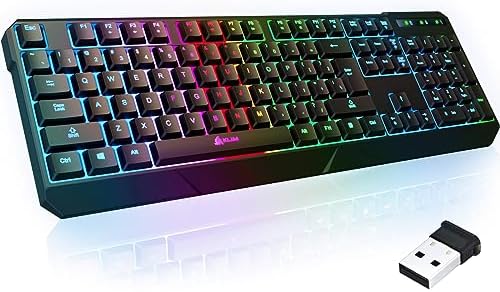
- ✅ INSTANT CONNECTIVITY. Plug in the USB receiver and you can use the KLIM Chroma wireless keyboard instantly, from up to…
- ✅ LONG-LASTING BATTERY. There’s no need to buy batteries anymore! The gaming keyboard comes with premium-quality built i…
- ✅ RGB BACKLIGHTING. Bring your desk to life! Choose static or breathing mode, or turn off the lights completely if you p…
Look — at this price, you’re not getting mechanical switches. The KLIM Chroma is membrane. But it’s a genuinely well-built membrane wireless board, and that’s rarer than you’d think.
What it does well:
- Rechargeable battery that lasts a respectable amount of time with RGB off.
- Water-resistant build, which I’ve never seen on a cheap wireless keyboard before.
- PS4, PS5, and Mac compatibility, not just Windows.
- Quiet typing — your roommate will not hate you.
What it doesn’t do: it’s not going to give you that satisfying clack or the precise actuation point of a mechanical board. If you’ve been on a real mechanical, this’ll feel like a step backward. If you’re upgrading from a beat-up office keyboard, it’s a clear win. As a true budget pick — under $50 territory — it’s the most honest wireless keyboard on this list.
Best Wired Alternative (Yes, Wired): Redragon K580 VATA

- Record Combos On the Fly, No Software Required – 5 dedicated macro keys (G1-G5) let you save complex combos or shortcuts…
- Swap Switches Without Soldering, Hype Clicky Feedback – The upgraded socket accepts almost any switch, and stock Blue sw…
- Built to Outlast Daily Gaming – Rated for 50 million keystrokes with double-shot keycaps that resist fading, so the boar…
I’m including this because it’s the best sub-$100 hot-swap mechanical I’ve seen this year, full stop. It’s wired. I’m not pretending otherwise. But if you can live with a cable, this gets you features that wireless boards at this price flat-out don’t have.
The K580 VATA brings:
- Hot-swappable sockets, meaning you can pop the Outemu Blues out and try linears, tactiles, or whatever else without a soldering iron.
- Macro keys and dedicated media controls down the left side. Genuinely useful for streamers or anyone juggling Discord, OBS, and a game.
- Onboard macro recording, so you don’t need to install software to remap things.
- Per-key RGB that’s actually configurable, not just preset patterns.
The Blue switches that ship with it are clicky and loud. Office co-workers will hate you. If you’re on a discord call, your mic will pick up every keystroke. The fix is easy though: pull the switches and drop in some pre-lubed linears. That’s the whole point of hot-swap.
Best Budget Combo: AULA T102 Keyboard and Mouse

- RGB Rainbow Backlit Keyboard: The aula keyboard and mouse is through rainbow backlit keyboard and RGB breathable backlit…
- Metal Panel Keyboard & Ergonomic Design: This wired computer keyboard and mouse combo boasts an aluminum alloy brushed p…
- Phone Holder & Floating Keycaps: This mouse and keyboard combo featuring a practical phone and pen bracket, this membran…
The T102 is a wired combo — keyboard plus mouse, both with RGB, both with a real aluminum top plate on the keyboard. For people building a first gaming setup, getting both pieces for the price of one mid-range board is hard to argue with.
What it nails:
- All-metal panel on the keyboard. At this price, that’s not normal — most budget boards are all plastic and flex when you hammer the keys.
- Full 104-key layout including number pad, for anyone who hated 75% boards in my section above.
- Plug-and-play with Win XP through Win 11, plus Mac. No software install, no drivers.
Caveats: the switches are membrane (rubber dome with mechanical feel), not true mechanical. The mouse is fine but nothing special — the DPI is fixed at certain steps. For a kid’s first gaming setup, a backup keyboard, or a LAN-party loaner, it’s a smart buy. Just don’t expect it to feel like a $200 mechanical. (My take on whether membrane boards still have a place in 2026.)
Best for Aesthetics: Retro Typewriter Mechanical Keyboard

- 【 Does The Mechanical Keyboard with Clicky Clack ? 】 – Yes, this gaming keyboard use the blue switch which offer medium …
- 【 How to Control The Light ? 】 – This black mechanical gaming keyboard offer multiple rgb light modes. Press Fn + Ins to…
- 【 What System Does It Match ? 】 – The plug of our retro gaming keyboard is USB port, which make it as easy as plug and p…
This one’s a vibe pick. Round chrome keycaps, blue clicky switches, black retro-punk housing, RGB backlight glowing through. It looks fantastic on a desk. The question is whether you can actually type on it for eight hours.
Here’s my honest take:
- The round keycaps look incredible but take real adjustment time. Your fingers will mis-hit for the first week.
- Blue switches are clicky and tactile — fine for typing, polarizing for gaming. Double-tapping is harder because of the long reset point.
- It’s wired, USB cable, full 104-key layout.
- Compatible with Windows, Mac, and most PCs.
If you mainly care about how your setup looks on Instagram or for a YouTube stream backdrop, this is a fun board. If you’re typing 10,000 words a day or grinding Apex, get something more conventional. I’d buy this for a secondary machine, not my daily driver. (More on why keycap shape matters more than people think.)
What I’d Actually Buy: My Verdict
If you’ve got close to $100 and you genuinely need wireless, get the Redragon K719. The gasket mount and pre-lubed switches put it in a different tier than anything else in this price range. Period.
If you need Bluetooth for multi-device life, jump to the GravaStar Mercury K1 Lite. Tri-mode connectivity at this price is unusual, and the 75% layout grows on you fast.
If your budget is closer to $50 and wireless is the priority, the KLIM Chroma is the honest answer. It’s membrane, but it’s a good membrane.
And if you’re open to running a cable, the Redragon K580 VATA is the smartest buy of the whole list. Hot-swap sockets at this price means you can grow with the hobby instead of buying a new board in six months.
One last thing. Don’t get caught up in the spec arms race. RGB modes, claimed battery numbers, “8000Hz polling” — most of that is marketing. What you’ll actually feel every day is the switch under your finger, the wobble of the stabilizer on your spacebar, and whether the cable (or dongle) gets in your way. Pick for those, and any of these boards will treat you right
This article contains affiliate links. If you buy through them, I earn a small commission at no extra cost to you. I only recommend keyboards I’ve actually tested. As an Amazon Associate I earn from qualifying purchases.

I’ve torn down, lubed, and rebuilt several hundred keyboards — from $20 membranes to $800 enthusiast boards. I review them honestly, even when “honestly” means telling you to skip the one with the bigger marketing budget.