What Is a Hall Effect Keyboard? Magnetic Switches, No Hype
This article contains affiliate links. If you buy through them, I earn a small commission at no extra cost to you. I only recommend keyboards I’ve actually tested. As an Amazon Associate I earn from qualifying purchases.
Three years ago, if you mentioned a Hall Effect keyboard at a meetup, two people would look up and the rest would shrug. Now every brand has one. Corsair, Asus, Razer, Logitech, Keychron, SteelSeries — pick a name, they’ve got a magnetic deck on the shelf. Budget options start at $40. So before you drop $250 on a Wooting because someone on Reddit said your aim would magically improve, let’s break down what’s actually happening inside one of these boards, what they do well, and where they’re not worth the money.
I’ve tested a stack of HE boards over the past couple of years, from the Wooting 60HE that started this whole thing to the Asus ROG Azoth 96 HE that’s been on my desk this month. Here’s the honest take.
Quick Comparison: Which Hall Effect Keyboard Should You Actually Buy?
If you scrolled here first — fair, I respect it. Here’s the cheat sheet, sorted by what you actually want.


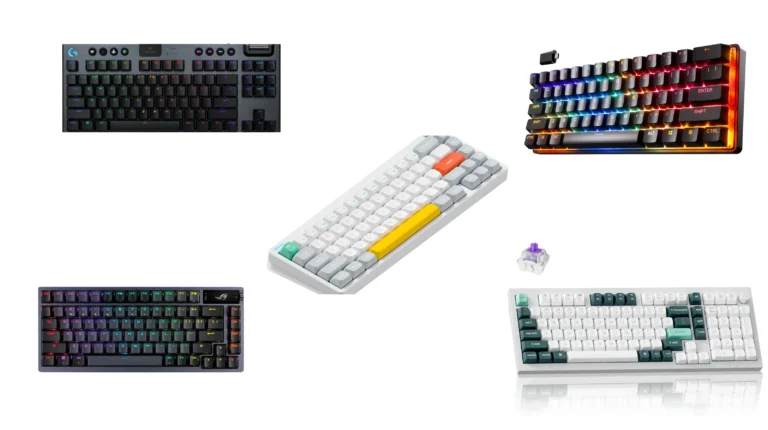
| Best For | Pick | Layout | Why It’s the One |
|---|---|---|---|
| Overall (still the benchmark) | Wooting 80HE | TKL | Wootility software, per-key tuning, the board every other HE deck gets measured against |
| Competitive FPS at the high end | Asus ROG Azoth 96 HE | 96% | Smoothest HE typing feel I’ve used, plus a real wireless mode |
| Compact 60% for gaming | Wooting 60HE | 60% | Same brain as the 80HE, smaller footprint, lighter wallet |
| Premium typing + analog | Keychron Q1 HE | 75% | Gasket-mounted, aluminum, doesn’t feel like a gaming toy |
| Solid budget pick | NuPhy Field75 HE / Epomaker HE80 | 75% / 80% | Real HE features under $100 |
| Cheapest worth owning | Aula Win60 HE | 60% | $40 and shockingly competent |
Pick one and click out if you want. The rest is the explainer for anyone still on the fence.
What Is a Hall Effect Keyboard, In One Paragraph?
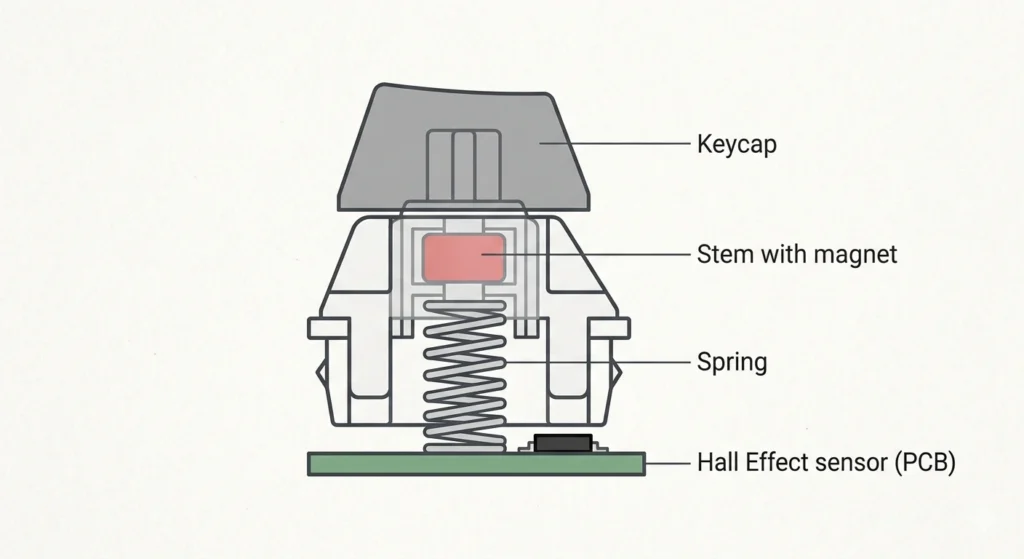
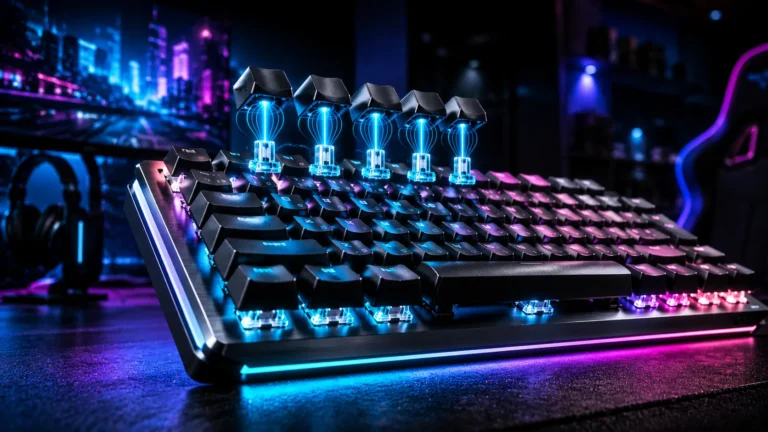
A Hall Effect keyboard uses magnets and magnetic sensors to detect keypresses instead of metal contacts. Each switch has a small magnet riding in the stem. As you push the key down, that magnet moves closer to a Hall Effect sensor on the PCB. The sensor reads the strength of the magnetic field and figures out exactly how far the key has traveled — not just “pressed or not pressed,” but “pressed 0.3 millimeters” or “pressed 2.1 millimeters.” That position data is what enables the fancy stuff: adjustable actuation, Rapid Trigger, analog input. None of which a traditional mechanical switch can do without serious hackery.
That’s the whole concept. The rest is execution.
How Hall Effect Switches Actually Work
In a regular Cherry MX-style mechanical, two metal leaves get pushed together at a fixed point in the key’s travel — usually around 2 millimeters down. They touch, they close the circuit, the board registers a press. There’s a debounce filter to ignore noise from the metal bouncing, which adds a few milliseconds.
A Hall Effect switch tosses all of that. No metal contacts. No bounce. Just a magnet, a sensor, and a microcontroller that converts the analog signal into something your operating system understands. Because the position is read continuously rather than at a fixed depth, the firmware can decide what counts as a press — and that’s where the interesting things happen.
What a Hall Effect Keyboard Can Do That Mechanicals Can’t
This continuous sensing is the reason HE boards have three party tricks no mechanical can match:
- Adjustable actuation. Set your WASD keys to trigger at 0.2 mm if you want a hair-trigger, or 3.5 mm if you keep accidentally activating Caps Lock. You can have different actuation depths per key, which is genuinely useful — light triggers for movement, deeper triggers for the modifier keys you don’t want to fire by accident.
- Rapid Trigger. The key resets the instant it starts moving back up, not at a fixed point. For counter-strafing in CS2 or Valorant, this is the feature people actually feel in their gameplay.
- Analog input. The board can output a range of values, not just on/off. Press W gently for a slow walk in a racing game, harder to floor it. If you play sim racers without a wheel, this is the real selling point.
Hall Effect vs Mechanical vs Optical: The Honest Comparison
Here’s where I’ll save you a long YouTube video.
| Feature | Mechanical (MX) | Optical | Hall Effect |
|---|---|---|---|
| Detection method | Metal contacts | Light beam | Magnetic field |
| Fixed actuation point | Yes (~2.0 mm) | Yes | No — adjustable 0.1–4.0 mm |
| Rapid Trigger | No | Some boards via firmware | Yes, native |
| Analog input | No | No | Yes |
| Typical lifespan | 50–70M presses | 100M+ | 100M+ |
| Hot-swap with MX switches | Yes | No (proprietary) | No (proprietary HE stems) |
| Typing feel options | Linear, tactile, clicky | Linear, clicky | Linear only |
| Price entry point | ~$30 | ~$60 | ~$40 |
The big tradeoff most people miss: HE switches are almost always linear. No tactile bump, no clicky click. If you love the feel of a Holy Panda or a Box Jade, an HE board is going to feel oddly flat to you no matter how good the chassis is. The physics of magnetic sensing don’t pair well with a tactile bump, and the few “tactile HE” attempts I’ve tried have been mushy compromises.
Why Pros Are Switching to Hall Effect in 2026
The short answer is Rapid Trigger plus per-key actuation tuning. For an FPS player, setting your strafe keys to 0.2 mm and having them reset the moment you lift your finger is a real, measurable advantage in counter-strafe-heavy games like Valorant, CS2, and Apex. Three years ago, the hall effect gaming keyboard was a niche curiosity championed by one Dutch startup and ignored by every major brand. Today, every serious keyboard manufacturer — Corsair, ASUS, Logitech, Razer, SteelSeries, Keychron — has a hall effect lineup. Rapid Trigger went from a Wooting party trick to table stakes in about eighteen months.
A few honest notes on the marketing side:
- 8000Hz polling rates are everywhere now. I’ve tested them. Above 1000Hz, you’re not going to feel the difference unless you’re a top-100 ranked player with a 540Hz monitor. The marketing department loves the number. Your reflexes don’t notice.
- “Snap Tap” / SOCD features are powerful, but several titles have banned them or are about to. Don’t buy a board for that feature unless you’ve checked your game’s current rules.
- 0.005 mm actuation claims are theoretical. The mechanical tolerances of the switch and your finger’s muscle precision are the real limit. Pretty marketing number, real-world meaningless past about 0.1 mm.
The Catch: Here’s What They Don’t Tell You About Hall Effect Keyboards
Every piece of tech has a tradeoff. HE boards have a few worth knowing before you commit.
- Linear only, basically forever. If you’re a tactile snob, this isn’t your category. Buy a nice mechanical with Boba U4Ts and be happy.
- Hot-swap is limited. Most HE boards are hot-swappable, but only with other HE switches that match the board’s specific sensor calibration. You can’t drop in a set of Gateron Browns and call it a day.
- Software dependency. All the cool features — Rapid Trigger, adjustable actuation, analog — live in the manufacturer’s software. Wooting’s Wootility is excellent. Some other brands ship configurators that feel like a 2014 hardware utility. Try before you commit if you can.
- Overkill for typing. If you write code or essays all day and never touch a competitive game, you’re paying for features you won’t use. A well-built mechanical with PBT caps and lubed stabs will give you a better typing experience for less money.
- The cheap ones can be rough. Sub-$50 boards are a real thing now, but build quality swings hard. Hollow cases, scratchy stabs, software crashes. The Aula Win60 HE is the exception — most $40 HE boards are not it.
Who Should Actually Buy a Hall Effect Keyboard?
A few honest categories.
Yes, get one if you:
- Play competitive FPS (Valorant, CS2, Apex, Overwatch) and care about your rank
- Play a lot of sim racers or flight sims and want analog input from a keyboard
- Like tuning settings and have the patience to play with actuation curves
Maybe — read carefully if you:
- Mostly do creative work but play casually. A premium HE board like the Keychron Q1 HE or Asus Azoth 96 HE is a luxury, not a need.
- Stream and want to look like a pro. Fine, but don’t pretend it’s about performance.
Skip it if you:
- Type for a living and rarely game
- Love tactile or clicky switches — you’ll hate the linear-only feel
- Already have a great mechanical and you’re chasing a marginal upgrade
That last one is where I see the most regret. A new Wooting won’t fix bad aim. A $90 NuPhy Field75 HE doesn’t suddenly become a $250 board because you spent the difference somewhere else.
My Verdict on Hall Effect Keyboards in 2026
Hall Effect is a real, useful piece of technology for a specific group of people. If you’re a competitive FPS player, the combination of Rapid Trigger and adjustable actuation is the most meaningful keyboard upgrade you can make right now. The Wooting 80HE is still my default recommendation because the software is so far ahead of everyone else’s that it makes the hardware feel smarter than it is. The Asus ROG Azoth 96 HE is the better typer if budget isn’t the constraint. The Aula Win60 HE proves you can get into the category for $40 and not embarrass yourself.
For everyone else — and that’s most people reading this — a great $90–120 mechanical with hot-swap, PBT caps, and lubed stabs is still the smarter buy. Spend the extra cash on a chair.
This article contains affiliate links. If you buy through them, I earn a small commission at no extra cost to you. I only recommend keyboards I’ve actually tested. As an Amazon Associate I earn from qualifying purchases.

I’ve torn down, lubed, and rebuilt several hundred keyboards — from $20 membranes to $800 enthusiast boards. I review them honestly, even when “honestly” means telling you to skip the one with the bigger marketing budget.